 promptbeen
ChatGPT AI photo editing prompts for beginners: a simple start
A beginner guide to ChatGPT AI photo editing prompts: what to write, what to keep unchanged, and how to fix a result that is almost right.
Prompts for trending prompt looks, couple photo prompt styles, romantic couple AI prompts, family photo prompts, and Gemini AI prompt copy paste.
Tap Copy Prompt on any of our ChatGPT and Gemini AI photo editing prompts, paste it into ChatGPT or Gemini with your photo, and finish a polished edit in seconds. Free, fast and no sign-up.
A vibrant, dynamic portrait capturing the ideal Garba look for young women during Navratri, formatted in a 3:4 aspect ratio. The central figure is a joyful young woman in her early 20s, full of energy and movement, smiling brightly at the camera. She is wearing a traditional and elaborately decorated Chaniya Choli. The outfit is made of layered, flared skirts in deep, jewel-toned colors, heavily embroidered with intricate Kutchi mirror-work, traditional thread designs, and shimmering gota patti borders. The fitted blouse is equally detailed with mirror work and worn with a coordinating, flowing dupatta adorned with tassels, draped gracefully over one shoulder. Her hair is styled in a beautiful, textured side-swept braid, decorated with fresh marigold and jasmine flowers. She is accessorized with authentic oxidized silver jewelry: a statement choker necklace, long dangling jhumka earrings, a stack of colorful glass and metal bangles, and a maang tikka. She is dancing in a lively Navratri pandal at night, surrounded by warm, glowing festive lights, colorful drapery, and other dancers. Shot on Canon EOS R5, f/1.4, with shallow depth of field. Full body portrait, vibrant colors.
Quick answer: AI photo editing prompts are short written instructions you paste into ChatGPT or Gemini together with a photo to change its light, style, background or text while keeping faces unchanged. promptbeen gives you free, copy-ready prompts for trending prompt looks, romantic couple AI prompts, family photo prompts, and Gemini AI photo prompt copy paste templates.
Every ChatGPT and Gemini AI prompt for photo editing below says what to change and what to keep the same. Explore couple photo prompt cards, family photo prompts, and new trending prompt styles. Replace any placeholder text, then paste it into ChatGPT or Gemini with your photo.
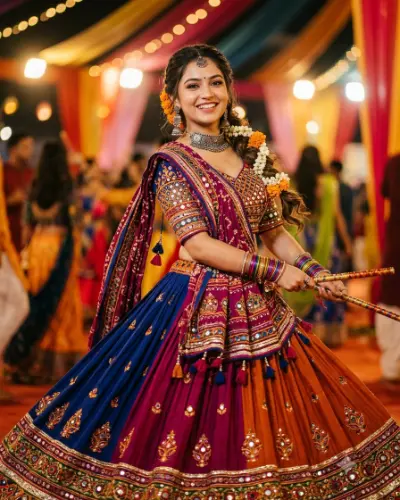
A vibrant, dynamic portrait capturing the ideal Garba look for young women during Navratri, formatted in a 3:4 aspect ratio. The central figure is a joyful young woman in her early 20s, full of energy and movement, smiling brightly at the camera. She is wearing a traditional and elaborately decorated Chaniya Choli. The outfit is made of layered, flared skirts in deep, jewel-toned colors, heavily embroidered with intricate Kutchi mirror-work, traditional thread designs, and shimmering gota patti borders. The fitted blouse is equally detailed with mirror work and worn with a coordinating, flowing dupatta adorned with tassels, draped gracefully over one shoulder. Her hair is styled in a beautiful, textured side-swept braid, decorated with fresh marigold and jasmine flowers. She is accessorized with authentic oxidized silver jewelry: a statement choker necklace, long dangling jhumka earrings, a stack of colorful glass and metal bangles, and a maang tikka. She is dancing in a lively Navratri pandal at night, surrounded by warm, glowing festive lights, colorful drapery, and other dancers. Shot on Canon EOS R5, f/1.4, with shallow depth of field. Full body portrait, vibrant colors.
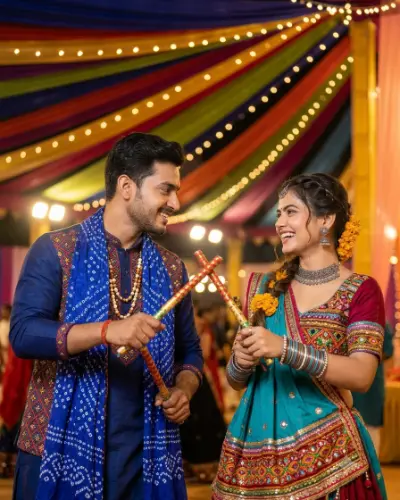
A common prompt for generating an image like this would be: "A candid, joyful photograph of a young Indian couple dancing Garba at night under a beautifully decorated canopy of colorful fabric and string lights. The man wears a blue traditional embroidered kurta with a bandhani dupatta and beaded necklaces, smiling. The woman wears a rich maroon and turquoise heavily embellished lehenga-choli with a braid adorned with marigold flowers and traditional silver jewelry, smiling brightly. Both hold and cross dandiya sticks, looking lovingly at each other. The background shows a festive, crowded pandal with other dancers. Authentic cultural textures, vibrant colors, shallow depth of field, warm light."
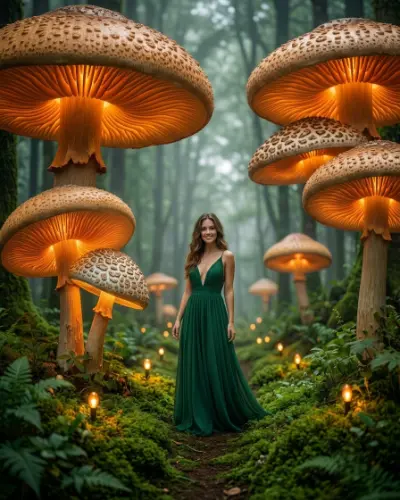
A full-body 3:4 vertical portrait of a beautiful young woman standing on a mossy path inside a magical, enchanted forest. She is wearing an elegant, flowing emerald-green silk gown with a plunging V-neckline. She smiles gently at the camera. Towering, giant glowing mushrooms with warm, golden-orange illuminating undersides and patterned caps frame the scene around her. The forest floor is covered in lush green moss, ferns, and tiny glowing fairy lights along a narrow dirt path. The atmosphere is mystical, ethereal, and dreamy with a soft, foggy background among towering trees. Cinematic lighting, photorealistic, highly detailed, vertical 3:4 aspect ratio.
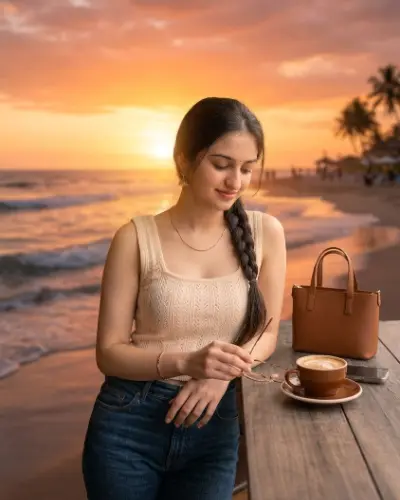
Keep the people in the photo exactly as they are: same faces, pose, clothing, and proportions. Replace only the background with a romantic beach at sunset, with a glowing orange and pink sky, gentle waves, and soft golden hour light. Match the lighting, color tones, and shadows on the people to the new background so it looks natural and realistic, with clean edges around hair and clothing. High resolution, photorealistic.

Edit this photo into a clean studio portrait on a seamless light grey backdrop. Soft box lighting, natural skin retouching, sharp eyes, no heavy smoothing. Keep my face and expression unchanged. Square 1:1.

Turn my photo into a magazine-style cover. Add the headline "YOUR TEXT HERE" in bold sans-serif at the top and a small subtitle at the bottom. Keep my face fully visible and not covered by any text. Soft studio lighting and muted colors.

Add the quote "YOUR QUOTE HERE" in elegant handwritten lettering in the lower third of my photo. White text with a soft shadow so it stays readable. Slightly darken the lower background and keep faces and the main subject untouched.

Redraw my photo as a hand-painted anime film frame. Soft watercolor sky, painterly clouds, gentle outlines and a warm natural palette. Keep my pose, outfit and the likeness of my face.

Give this photo the look of a 1990s disposable camera. Direct flash, slightly faded colors, soft grain, small light leaks and a warm date-stamp feel. Do not change faces or poses.

Replace only the background with a cozy window-side cafe in soft morning light. Match the lighting direction on my face. Keep my face, clothes and the edges of my hair exactly as they are. Natural, realistic result.

Remove all strangers and clutter from the background and fill the space with natural scenery that matches the light and perspective. Do not blur or alter the main subject. Keep the original color tones.

Edit this couple photo into a festive evening scene with warm string lights and soft bokeh. Keep clothes, faces and skin tones the same. Add a gentle glow, a calm mood and a vertical 9:16 crop for Stories.
Convert my photo into a moody black and white portrait with deep shadows, strong contrast and fine film grain. Dramatic side lighting, sharp eyes, natural skin texture. Keep my face unchanged.

Create a glossy, collectible-style figure of the person in my photo standing on a small round display base. Clean studio backdrop, soft reflections, accurate clothing colors and a face that clearly resembles me. Square 1:1.

Edit this couple photo into a rainy evening in a city. Shared umbrella, soft street lights reflecting on wet pavement, gentle mist and a calm romantic mood. Keep both faces, hairstyles and clothes unchanged and make sure neither person is hidden by the umbrella.

Turn my photo into a birthday card. Add the text "HAPPY BIRTHDAY, NAME" in playful rounded lettering above my head, with small confetti around the edges. Keep my face and expression untouched, and keep every letter spelled exactly as written.

Edit my photo into a vintage travel poster. Add the title "VISIT YOUR CITY" in bold condensed letters at the bottom on a solid color band, flatten the colors slightly and add a subtle paper texture. Keep my face clear and recognizable.

Arrange my photo into a collage of three instant-film frames on a soft beige table, each frame showing a slightly different crop of the same image. Gentle shadows, natural light from a window and no changes to my face in any frame. Vertical 4:5.

Turn my casual photo into a professional headshot. Neutral blurred office background, soft front lighting, tidy collar and hair, natural skin texture without over-smoothing. Keep my face, age and expression exactly the same. Square 1:1.

Redraw my photo as a single comic book panel with bold ink outlines, halftone shading and a flat color palette. Keep my pose, outfit and face shape recognizable, and leave a small empty speech bubble in the upper corner.
No prompts match that search. Try a different word or clear the filter.
AI photo editing prompts are short written instructions that you paste into ChatGPT or Google Gemini together with a photo you upload. A strong prompt for photo editing names the change you want, such as the lighting, the background, the style or the crop, and then names what must stay the same: usually the face, the pose and the clothes. That second half is the part most people forget, and it is the difference between a polished edit and a result that no longer looks like you.
promptbeen collects tested ChatGPT and Gemini prompts in one place, so you do not have to dig through screenshots, captions and comment threads. Every card has a Copy Prompt button, and the free prompt tool lets you generate, modify, edit and correct your own wording.
Looking for a reliable gemini ai photo prompt copy paste? Google Gemini's image editing capabilities excel when provided with explicit photographic context. A high-performing gemini ai prompt copy paste specifies camera perspective, ambient lighting, lens characteristics, and strict identity preservation. Every prompt card in our library is engineered to function as a Gemini AI photo prompt copy paste—just copy the text, attach your picture in Gemini, and generate stunning portraits, couple shots, or group scenes without facial distortion.
Capturing the intimacy and chemistry of two people requires a specialized couple prompt for Gemini AI. Generic AI edits frequently blend two faces together or morph facial features. Our gemini ai couple photo prompt copy paste templates and romantic couple ai prompts enforce a dual-identity lock, instructing the model to "keep both faces, hairstyles, and outfits unchanged". Whether you need a couple romantic prompt for gemini ai featuring golden hour beach sunsets, a misty rainy city scene, or an editorial gemini prompt couple studio shot, our couple photo prompt library ensures both people remain natural and recognizable.
Editing group pictures is challenging because AI models often scramble multiple faces or alter ages. Our curated family photo prompts provide structured multi-person instructions. By using these family photo prompts, you can place your family in a sunlit botanical garden, a cozy holiday living room, or a clean studio setting while keeping every family member's smile, facial structure, age, and clothing authentic.
Instagram aesthetics move fast. As soon as a fresh visual trend takes off—from 3D miniature dioramas and collectible figures to 90s disposable camera film grain—we release a new trending prompt optimized for both Gemini and ChatGPT. By copying a verified trending prompt from promptbeen, you get the exact aesthetic grading and lighting formula without wasting time on guesswork. Check our guide on how trending prompts work for the full breakdown.
Words on photos are one of the most requested edits. ChatGPT photo editing prompts text works best when you give the exact wording, a lettering style and a position. For example: headline in bold sans-serif at the top, small subtitle at the bottom, face never covered. Keep phrases short and check every letter, because long sentences are where spelling mistakes appear. Start with the magazine cover, quote overlay and birthday card prompts, which already use text blocks you can edit in seconds.
Many visitors arrive after searching for a prompt seen ChatGPT creators mention in a Reel, a Story or a comment. Captions often cut the prompt off, or the creator only shows the result. The fastest fix is to search the library by style, copy the closest match, and then use the corrector and modifier to rebuild the missing pieces. If the prompt seen ChatGPT edit used a trending look, the Trending Instagram filter is the quickest place to start. For a full walkthrough, read how to find and rebuild a prompt seen ChatGPT creators use.
Key terms people search for, defined in plain words.
Match your goal to the right type of prompt.
Most failed edits come from the same few mistakes, and each one is easy to fix. Skipping the identity lock is the biggest: without it, ChatGPT AI photo editing prompts let the model redraw faces. Mixing three styles in one ChatGPT prompt for photo editing is the second, because the result blurs.
Long text is the third. ChatGPT photo editing prompts text with a full sentence often returns a misspelled word, so keep ChatGPT photo editing prompts text under eight words. For a couple prompt ChatGPT must name both people, not just "my face". When you copy ChatGPT photo editing prompts trending Instagram creators posted, read every line, because a prompt seen ChatGPT users shared may include a style you do not want.
Finally, change one detail per attempt. Whether you use ChatGPT AI photo editing prompts for portraits, a couple prompt ChatGPT scene or ChatGPT photo editing prompts text, small edits teach you what each line does.
Pick the kind of edit you want and jump straight to the guide and matching prompts.
Copy the ChatGPT photo editing prompts trending Instagram feeds love, from retro flash to collectible figures.
Use a couple prompt ChatGPT can follow for beaches, city nights and festive lights.
ChatGPT photo editing prompts text templates for covers, quotes and birthday cards.
Every ChatGPT prompt for photo editing here protects faces while it changes the light or scene.
Three steps, no sign-up on this site.
Pick a look in the library and tap Copy Prompt.
Open ChatGPT, attach your picture and paste the prompt. Change any placeholder text first.
If it is close, ask for one small change. Use the prompt tool to adjust the wording.
Every ChatGPT prompt for photo editing here follows these steps. Use a ChatGPT prompt for photo editing as a template, edit one line, and save the version you like. A rebuilt prompt seen ChatGPT users shared and a copied ChatGPT prompt for photo editing both improve after two or three small changes. If a ChatGPT prompt for photo editing gives a stiff result, soften the light. If a prompt seen ChatGPT creators posted changes your face, add the identity lock. These ChatGPT photo editing prompts trending Instagram creators love also work for your own feed, and ChatGPT photo editing prompts trending Instagram looks need only a new crop.
The free prompt tool combines a prompt generator, modifier, editor and corrector. It runs in your browser, so your text stays on your device.
Corrector example
Before: edit my photoo wiht cinamatic ligting, dont change face
After: Edit my photo with cinematic lighting, don't change face.
Jump straight to what people look for most.
Retro flash, golden hour, collectible figures and more ChatGPT photo editing prompts trending Instagram feeds repeat.
Every couple prompt ChatGPT scene keeps two faces consistent. Try beach, neon street and festive lights.
Add a headline, quote or name with ChatGPT photo editing prompts text that never covers faces.
The six-part formula behind a reliable ChatGPT prompt for photo editing, with templates.
Rebuild a prompt seen ChatGPT creators shared when the caption is cut off.
Start with simple ChatGPT AI photo editing prompts and change one detail at a time.
Tips for getting cleaner results from ChatGPT photo edits.
A beginner guide to ChatGPT AI photo editing prompts: what to write, what to keep unchanged, and how to fix a result that is almost right.
How promptbeen web stories show ChatGPT photo editing prompts in short, swipeable slides, and how to turn a story into your own edit.
A simple five-step method to get clean, realistic edits from ChatGPT without changing your face, plus the mistakes to avoid.
ChatGPT AI photo editing prompts are written instructions you paste into ChatGPT together with a photo you upload. The prompt tells ChatGPT what to change, such as lighting, background, style or text, and what to keep the same, such as your face.
Open ChatGPT, upload your photo, paste the prompt you copied from promptbeen, edit any placeholder text like YOUR TEXT HERE, and send it. If the result is close but not perfect, ask for one small change at a time.
Yes. Every one of our ChatGPT AI photo editing prompts is free to copy and use for personal or commercial projects. Image-editing availability and usage limits inside ChatGPT depend on your plan and region, so check OpenAI's current help pages.
Search the library by keyword, or tap a category chip such as Trending Instagram or Couple. Most viral looks mix lighting, style and a keep-my-face-unchanged line, so you can rebuild a prompt seen ChatGPT users mention by starting from the closest match and adjusting it in the Prompt Tool.
Yes. Use ChatGPT photo editing prompts text templates from the library and replace the placeholder with your own words. Keep the text short, name the lettering style you want, and say where it should sit so it does not cover faces.
Yes. Open the Couple filter on the home page. Each couple prompt ChatGPT users copy from promptbeen tells the model to keep both people recognizable while it changes the scene, light or style.
A good ChatGPT prompt for photo editing has six parts: the action, the subject, one style, the light and color, what must not change, and the output crop. Our formula guide shows each part with templates.
Retro film flash, golden hour portraits, hand-painted film frames, collectible figures and magazine covers appear again and again. The ChatGPT photo editing prompts trending Instagram feeds favor all share a look, a lighting idea, a crop and an identity lock.
Our ChatGPT photo editing prompts web stories are short, swipe-through slides that show a set of ChatGPT AI photo editing prompts in under a minute. Each story covers one topic, such as ChatGPT photo editing prompts trending Instagram creators reuse, and ends with a link to the full guide.
Start with the action, name the subject, pick one style, describe the light, say what must stay the same and finish with the crop. A ChatGPT prompt for photo editing that follows those six steps is usually 30 to 80 words. The free prompt tool builds that structure for you.
Start with the Trending Instagram filter, because most prompt seen ChatGPT threads describe a look rather than a full prompt. Copy the closest card, then use the corrector and modifier to rebuild what the Reel did not show. Our web stories also list the most requested ChatGPT photo editing prompts trending Instagram feeds.
The sunset beach, neon street and festive lights scenes are the most copied. Every couple prompt ChatGPT can follow reliably repeats the identity lock for both faces, so keep that line when you edit the scene. Our couple web story shows five scenes in one swipe.
Yes. ChatGPT photo editing prompts text templates work best with the exact wording, one lettering style and a clear position. Replace YOUR TEXT HERE, keep the phrase short and check every letter after the edit.
The model samples a new image on every run, and your photo, plan and app version all change the outcome. Treat ChatGPT AI photo editing prompts as repeatable starting points and change one detail at a time instead of rewriting everything.
Most do, but results are best on sharp, well-lit photos. When you copy ChatGPT photo editing prompts trending Instagram looks, keep the identity lock, match the crop to the platform and adjust the light to suit your picture.
End the couple prompt ChatGPT receives with a clear line such as: keep both faces, outfits and poses unchanged. Naming both people, not just "my face", is what stops the model from redrawing the second person.
Describe the look in the search box, then open the prompt seen ChatGPT creators mention in the matching category. The corrector fixes typos and missing words, and the generator rebuilds the structure around the part you remember.
Yes. ChatGPT photo editing prompts text for posters and birthday cards work well when you choose a bold lettering style, one solid color band for the words and a position that never covers faces. Our text web story shows four ready examples.
Yes. All ChatGPT AI photo editing prompts on promptbeen are free to copy. When you share a prompt, a link back to promptseen.site is appreciated but not required.
Yes. Every prompt in our library is engineered to be dual-compatible as a Gemini AI photo prompt copy paste as well as for ChatGPT. Simply copy the prompt, attach your photo in Gemini, and paste it directly.
A good couple prompt for Gemini AI describes the shared scene, ambient lighting, and mood while explicitly including a face-safety lock stating: "keep both faces, expressions, and clothing unchanged". This prevents Gemini from redrawing or swapping features.
Effective family photo prompts focus on harmonizing the background, color palette, or lighting while strictly locking each person's likeness, age, and smile. Prompts that specify "keep every family member's identity and facial features unchanged" produce the cleanest group edits.
Browse our Trending Instagram category on promptbeen. We regularly add each new trending prompt—from 90s disposable film and 3D miniature dioramas to golden hour portraits—complete with face-safe instructions ready to copy and paste.
The best romantic couple AI prompts specify realistic camera lenses (35mm or 50mm), natural rim lighting or rainy reflections, and subtle film grain rather than digital smoothing. Keeping natural poses and genuine chemistry makes the couple photo prompt look authentic.
A couple romantic prompt for Gemini AI is a descriptive instruction for an intimate couple scene—such as a beach sunset, neon city street, or cozy cafe—that tells Google Gemini exactly how to style the scene while preserving both individuals' real faces.